Nano Banana 2 Hands-On: Infinite Ratios, Faster Generations, and Where It Falls Short
Model Reviews · May 25, 2026 · 3 min read
When the original Nano Banana dropped, it didn't just make waves in the AI art scene, it became a go-to for a lot of serious creators pretty fast. So yeah, the sequel has people paying attention.
Nano Banana 2 is all about giving you more room to work: custom aspect ratios, native 2K output, and none of the agonizing wait times. On paper, that's a pretty compelling upgrade.
Here's how it actually holds up, custom scales on one side, typographic precision on the other.
What’s New in Nano Banana 2?
Nano Banana 2 brings a few upgrades that matter, especially if you're generating assets at scale:
Faster renders. High-res images now take around 20 seconds — quicker and cheaper for high-volume work.
2K by default. No more low-res previews or extra upscaling steps. It just outputs at 2K out of the gate.
Flexible aspect ratios. It defaults to 16:9, but you can dial in Portrait (3:2), Square (1:1), Ultrawide (21:9), or go extreme with ratios like 8:1 or even 10:1.
The Performance Test: Composition and Text Precision
We ran two sets of tests, one pushing the aspect ratio settings, the other checking how well it follows text-based instructions.
Test 1: Ultra-Wide Scroll
First up, we went extreme on the aspect ratio to see if it could hold a coherent scene across a very wide canvas.
A continuous fantasy landscape scroll in an 8:1 aspect ratio. From left to right: a mystical forest, a glowing river, and a distant mountain range under a sunset.

Test 2: Text Precision and Typographic Logic
Next, we threw a text-heavy scene at it, specific words, structured layout, real data. This is where most generative models struggle, and Nano Banana 2 is no exception.
A detailed hipster coffee shop menu written on a large chalkboard. At the top it says "NANO ROASTERS". Below it, three sections. Section 1: "Espresso 3.50", "Latte 4.50". Section 2: "Chemex 6.00", "Aeropress 5.00". Section 3: "Croissant 3.00", "Muffin 2.50".
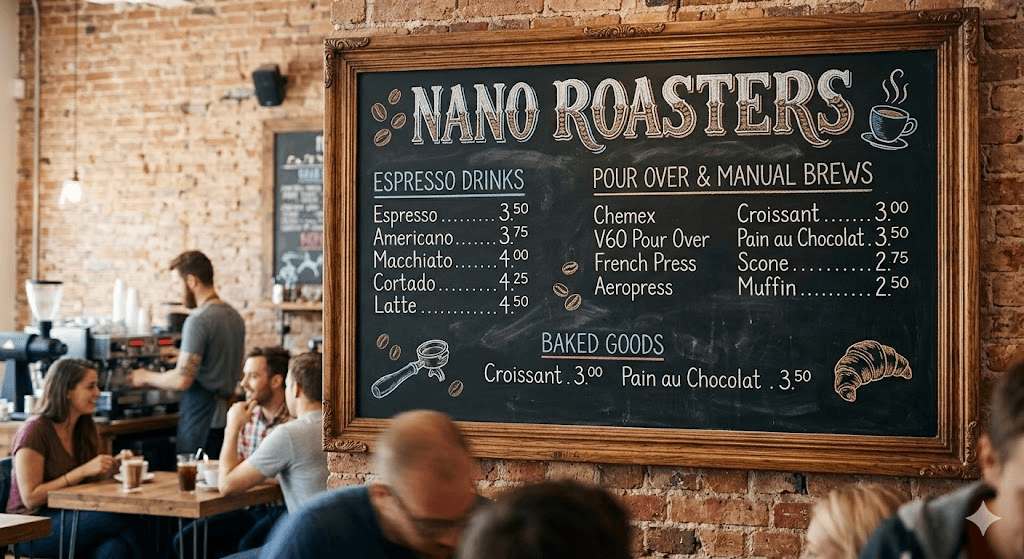
Image quality? Stunning. But the execution fell apart in the details. The main headers came through fine, but the prices in Section 2 were just gone. Worse, the model invented products and extra chalkboard text that were never in the prompt.
It can make text look beautiful, but don't trust it with precise data. Not yet.
Observations: Ratio Flexibility vs. Detail Accuracy
Nano Banana 2 is a big step forward for speed and creative control, but it's clearly built to impress visually, not to follow instructions to the letter.
Pros
Total canvas freedom. Extreme aspect ratios like 8:1 or 10:1 work surprisingly well, with solid composition and no awkward repetition.
Fast 2K output. Native 2K in ~20 seconds means no separate upscaling step, your iteration loop gets a lot tighter.
Cons
Shaky text and data accuracy. Dense, structured text prompts are a weak spot. Expect missing numbers, ignored details, and hallucinated content filling the gaps.
Final Thoughts
Nano Banana 2 is a specialist, not an all-rounder. For ultra-wide layouts and fast high-res output, it genuinely delivers. But if your project hinges on precise typography or accurate data, it's going to let you down.
The smart move: use Nano Banana 2 for the environment, lighting, and composition, then clean up the text in post. Paired with Areze AI Creative Studio's broader model library, you've got a solid fallback for when precision matters.
Know its limits, play to its strengths, and it earns a spot in your toolkit.