
Optimizing YouTube: Discovering the Best Times to Post for Growth
Best Of · June 8, 2026 · 6 min read
YouTube success comes down to signals, and one of the most underrated ones is timing.
The algorithm doesn't just look at your content. It looks at how fast your audience responds to it. That initial burst of engagement in the first hour or two after posting is what tells YouTube whether to push your video further or let it quietly disappear. Post when your audience is asleep and you've already lost that window before anyone's had a chance to watch.
This guide breaks down how to find your best posting times using real data, what actually drives viewer behavior, and how tools like Areze AI Creative Studio can help you stay consistent when life gets in the way.
How the YouTube Algorithm Actually Works in the First Few Hours
The first 2 to 4 hours after you post are the ones that matter most. YouTube is watching your Click-Through Rate and Average View Duration almost immediately, and if those numbers look strong early, the algorithm takes it as a signal to push your video to a wider audience.
That's why the best time to post isn't when your audience is most active, it's a couple of hours before. You want your video already indexed and ready by the time the bulk of your viewers come online. Show up late and you're already behind.
Think of it like a restaurant opening. You don't unlock the doors and then start prepping the kitchen. Everything's ready before the first customer walks in.

Upload Time vs. Publish Time: Why They're Not the Same Thing
A mistake a lot of new creators make is hitting "Public" the second the upload bar hits 100%. That's not when your video is ready, that's just when the file finished transferring.
After the upload completes, YouTube still needs to run copyright and ad-suitability checks, and process HD and 4K versions of your video. That takes time. If you publish too early, viewers might be watching a lower-quality version while the full resolution is still processing, not a great first impression during the window that matters most.
The fix is simple: upload your video at least 2 to 3 hours before you want it to go live. Schedule the publish time, walk away, and let YouTube finish its side of the job before your audience shows up.
How long do YouTube videos take to upload?
Roughly 10 to 30 minutes depending on your internet speed and file size, and that's before YouTube's processing kicks in. Factor both into your timeline and you won't be caught scrambling at the last minute.
The Best Days to Post on YouTube
No two channels are identical, but the aggregate data across millions of uploads points to the same pattern consistently: Thursday and Friday are the strongest days to post.
As the week winds down, people shift from work mode into browsing mode, looking for something to watch over the weekend. Saturday and Sunday see high traffic too, but earlier in the day than you might expect.
Monday through Wednesday is a different story. Viewers are heads-down and tend to reach for shorter content during the week. If you're trying to stay consistent on those days without the overhead of a full production, Areze's YouTube Shorts generator can help you keep something going without burning out.
How to Find Your Own Best Posting Time
General benchmarks are a decent starting point, but your own channel data will always be more accurate than any industry average.
Head to YouTube Studio, go to Analytics, then Audience. There's a heat map there called "When your viewers are on YouTube,” it shows you exactly when your specific audience is active, broken down by day and hour. That's the number you should actually be optimizing around, not someone else's aggregate data.
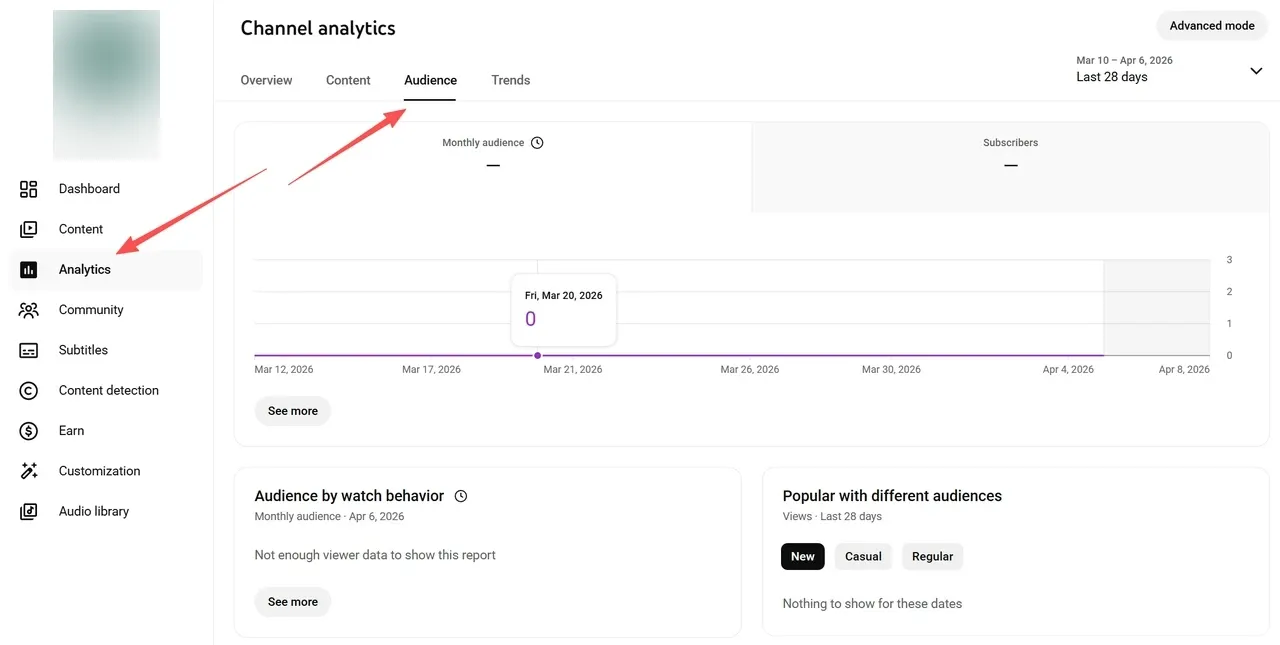
So if your heat map shows peak activity at 6:00 PM, aim to publish around 3:00 or 4:00 PM. By the time your audience is most active, your video has already been indexed, processed, and is showing up where it needs to, on their homepage, ready to click.
What to Do When You Don't Have Enough Data Yet
New channel, no analytics to speak of? Look at what's already working in your niche.
YouTube doesn't show exact publish times publicly, but third-party tools and browser extensions can surface that information for you. Find a few established channels in your space, check when their best-performing videos went live, and use that as your starting point. It's not a permanent strategy, once your own data starts coming in, lean on that instead, but it's a smarter baseline than guessing.
How to Get Videos Ready Faster
The biggest reason creators miss their optimal posting window isn't that they don't know when to post, it's that they're still editing when the window opens.
Areze AI Creative Studio is built around that problem. Whether you're using the script-to-video tool to turn a blog post into a tutorial or the clip maker to repurpose long-form content into shorter cuts, the output is post-ready. Less time assembling clips, more time on the stuff that actually grows your channel.
Time Zones and Viewer Mindset
Timing isn't just about the clock, it's about where your audience is and what headspace they're in when they open YouTube.
If you're based in London but most of your viewers are in New York, your 6:00 PM isn't their 6:00 PM. For creators with a global audience, the 8:00 AM to 11:00 AM EST window tends to perform well, it catches Europe in the evening and the US in the morning simultaneously.
Beyond time zones, think about mood. Morning viewers are usually after news or motivation. Evening viewers want to decompress, gaming, storytelling, something that doesn't require much effort. Matching your content type to the viewing context is just as important as the timestamp.
Staying Visible Every Day
One long-form video a week isn't enough to stay consistently in front of your audience. The channels that dominate their niche are posting something every day, not always a full production, but enough to keep the algorithm receiving regular signals from your channel.
A practical approach: anchor your week around one main video, then use Areze's teaser video maker to fill the gaps. A short teaser on Tuesday building up to a Friday launch keeps your channel active without doubling your workload. Get started with Areze to build that kind of rhythm without burning out.
Final Checklist Before You Hit Publish
Run through this before every upload:
Check your YouTube Studio heat map for current audience activity patterns
Upload at least 3 hours before your scheduled publish time, more for 4K
Match your content type to the day, educational early in the week, entertainment heading into the weekend
Wrapping Up
The best time to post on YouTube is part data, part intuition, and part consistency. The algorithm will do its job if you do yours, show up regularly, post at the right time, and make sure your video is ready before the window opens.
Areze AI Creative Studio helps with the production side so timing doesn't become the bottleneck. Start creating with Areze and see how much easier the schedule becomes.